Web SDK
For HTML5 games (itch.io, CrazyGames, Poki, your own site) and web apps. One file, no dependencies, about 64 KB (22 KB gzipped). It adds a chat button, or opens from your own Help button.
Install
Download inngame.js and host it with your game (or load it from that URL). The shortest setup is one tag with your public app key (inbox → Settings → Apps → General):
<script src="inngame.js" data-app-key="app_…"></script>Or start it yourself to pass options:
<script src="inngame.js"></script>
<script>
  Inngame.init({
    appKey: "app_…",
    appVersion: "1.2.0",
    launcher: false,               // no floating button: open it from your menu
    context: () => ({ level: player.level, coins: player.coins }),
    onItemGranted: (item) => inventory.add(item.id, item.quantity),
  });
  helpButton.onclick = () => Inngame.open();
</script>
It also loads as a CommonJS module (require("./inngame.js")) for bundlers. TypeScript types: download inngame.d.ts next to the script (import Inngame = require("./inngame"), or the global window.Inngame). Every option and callback is documented in it.
What players get
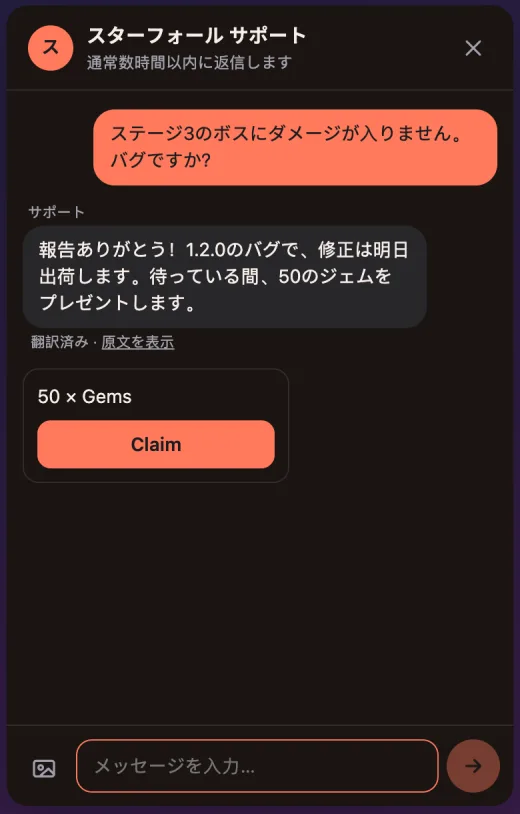
- The chat in their language: 25 languages for the interface, and your team's replies translated by the server, with “Show original”.
- Photos from their device, resized before upload and moderated by the server.
- Messages written offline wait in the browser (even across a reload) and leave when the connection returns, never twice.
- Real-time replies over WebSocket, with polling as a fallback. A badge counts unread replies while the chat is closed.
- Your title, welcome text, logo and colors from the dashboard (Appearance: accent, background, text, header, team and player bubbles, or a preset such as Dark fantasy or Sci-fi), light or dark to match their system.
- Your announcement at the top (an outage, a known bug), translated, until the time you set in the inbox.
- Under the title: your usual reply time, or when you're back outside office hours, in their local time.
- Cards: store review, links, item claims, offers, screens and the 1 to 5 satisfaction rating.
- Full screen on phones; Escape closes it on desktop.
Context sent with each message
Page URL, screen and viewport, browser, language, time zone, time since load, the last 50 console errors and warnings (plus uncaught errors), and whatever your context() function returns, under game. Turn off the console capture with captureLogs: false. Your team sees it all next to the conversation.
Items and offers
When your team sends an item, the player taps Claim. The SDK sends a random nonce and calls onItemGranted only if the server says this claim won, so an item is never granted twice, even with two tabs open or a flaky network. Without onItemGranted, the button stays disabled. For server-side granting, use the item.claimed webhook instead.
onOffer(offerId), onScreen(name, value) and onRestorePurchases() close the chat and hand over to your game.
Identity
Players start anonymous; the browser keeps their device token in localStorage, so the conversation is still there next visit. To attach your account system:
await Inngame.identify({ userId: "u_42", name: "Nova", token: jwtFromYourServer });Without token the user id is a label only, never a merge. See Player identity.
Reference
| Call | What it does |
|---|---|
Inngame.init(options) | appKey (required), baseUrl, language (default: the browser's), appVersion, user (identity at start), launcher, position ("right" or "left"), theme ("light", "dark", or the system), zIndex, captureLogs, context, and the card callbacks. Returns a promise. |
Inngame.open() · close() · toggle() | Show or hide the chat. |
Inngame.unread · isOpen · user · config | Current state. |
Inngame.on(event, fn) | "unread" (count), "message" (a reply arrived), "open", "close". Returns a function that removes the listener. |
Inngame.identify(identity) | {userId, name, email, token, metadata}. |
Inngame.track(name, props, opensChat) | A game event for automations; resolves true if one opened the chat. |
Inngame.logout() | This browser continues as a new anonymous player. |
Inngame.deleteData() | Erases the player and their conversations. Resolves true. |
Inngame.isUnavailable() | true while your support is unavailable (your Inngame workspace is suspended). The chat then says “Support is unavailable right now. Please try again later.” in the player's language and hides the composer; unsent messages wait and are sent once support is back. The SDK checks again every 10 minutes while the chat is open and each time it opens, and returns to normal on its own. Meanwhile track resolves false, identify null (the identity is kept for later) and deleteData false; nothing throws into your code. |