How to support players in every language
A game on Steam or the App Store sells in dozens of countries from day one. Support usually doesn't: the team answers in English, maybe in one more language, and everyone else either struggles through a translator or doesn't write at all. Here's how small teams can answer players in their own language without hiring a support person per market, and where automatic translation needs a human eye.
Published 31 October 2026 by the Inngame team. We build an in-game support chat with translation built in, so this guide describes how we handle it and what we'd watch for with any tool.
Why language matters more in support than in the game
Players put up with a game that's only in English far more readily than they put up with support in English. When something goes wrong, they're already frustrated, and explaining a missing purchase or a lost save in a second language is hard. Many won't try. They refund, uninstall, or leave a review in their own language that your team can't read either.
The questions themselves are rarely complicated: a purchase that didn't arrive, a crash on a given phone, a lost account, a level that seems impossible. What gets in the way is the language barrier, not how hard the problem is.
The usual options
- English only. Free, and fine if almost all your players speak it. You'll never know how many players gave up before writing.
- Copy and paste into a translator. It works, but every message takes two extra round trips, the team can't search conversations in one language, and people stop doing it on busy days.
- Native speakers or an outsourced support team. The best quality, and the right call once a market is big enough. For a small studio it's expensive, and nobody covers twenty languages at 3 a.m.
- Translation built into the support chat. The player writes in their language, the team reads it in theirs, and the reply goes back translated. It costs little and works at any hour. The trade-off is machine translation quality, which the next sections cover.
How two-way translation works in practice
Here's the flow in Inngame. Other tools differ in the details, but this is the setup we'd recommend looking for:
- The chat speaks the player's language. The chat window itself (buttons, placeholders, "sending…", "not sent") ships in 25 languages and follows the device language, or the language you pass from your game's settings.
- The player writes as they normally would. The server detects the language and translates the message into your team's working language, which you choose per game. The detected language is saved on the player profile.
- Your team reads and replies in its own language. In the web inbox, Telegram or Discord, the translation shows first and the original stays one click away.
- The reply is translated back. The player sees it in their language, marked as translated, with a button to show the original.
- Everything else follows. The welcome text, an outage announcement at the top of the chat, and the AI's answers from your FAQ are translated too. The AI writes in your team's language, so the team can read what it said, and the player gets it in theirs.
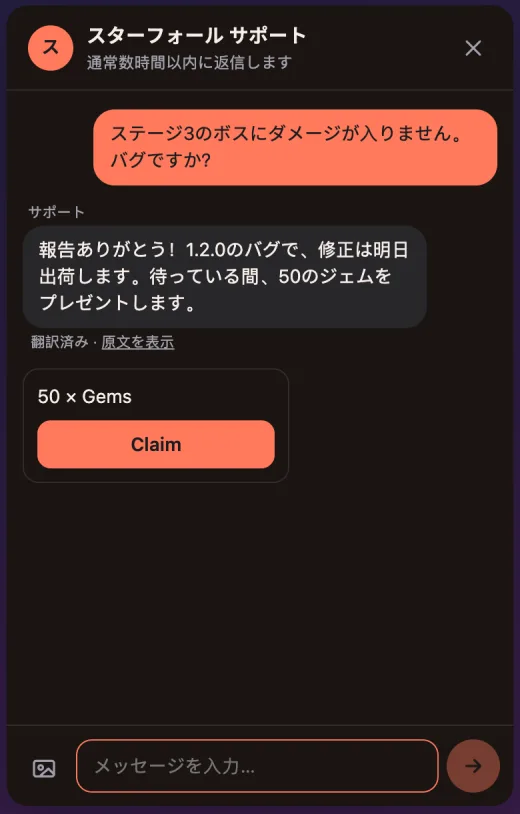
Translation runs on a large language model (Llama 3.3 70B on Cloudflare Workers AI) by default. Studios that prefer their own provider can plug in an Anthropic or OpenAI key, and the requests go to their account.
What machine translation gets wrong
Translation by a large language model is good at ordinary support conversations in the major languages. It goes wrong in predictable places:
- Your game's own words. Item names, classes and made-up places may be translated literally. Writing them in quotes or with a capital letter helps.
- Slang, sarcasm and memes. "Great, lost everything again, love it" can come out as praise. Read the original when the tone matters.
- Very short messages. "ok", "lol" or a single word may be detected as the wrong language. They usually don't need translating anyway.
- Rarer languages. Quality drops for languages with less training data. Keep replies short and simple there.
- Anything legal or about money. Refund terms and account deletion deserve a careful read of the original before you act on them.
The safeguard is the same for every case: never hide the original. Both the team and the player can see it, and the player always knows a message was translated.
Writing replies that translate well
- Short sentences, one idea each. Lists translate better than long paragraphs.
- Skip idioms and jokes in instructions ("it's a piece of cake" may arrive word for word).
- Name screens and buttons exactly as they appear in the game, and if your game is localized, give the path rather than the label: "Settings, then the third tab".
- Put numbers, versions and codes in digits: "version 1.4.2", "order 58213".
- Save your most common replies in your team language and let translation do the rest, rather than keeping one copy per language.
When to add a native speaker
Translation is a good default, not a ceiling. Look at your conversations by language once a month. If one language makes up a large share of support, or if those players keep asking for clarification, that market is worth a part-time native speaker or a community moderator. They can answer from Telegram or Discord without learning a new tool, and translation still covers the other languages.
Questions
Is machine translation good enough for player support?
For most support conversations in the major languages, yes: a large language model handles the usual questions about purchases, bugs and accounts well. It struggles with slang, jokes and your own game's vocabulary, so both sides can always open the original message.
Does the player see that the reply was translated?
Yes. Translated messages are marked, and the player can switch to the original text with one tap. Hiding translation tends to backfire the first time a sentence comes out strange.
What happens to item names and game terms?
They may be translated literally. Writing them in quotes or with a capital letter helps, and the original is always one tap away for the player.
Does translation cost extra?
Not with Inngame: translation is included in every plan, with its own monthly allowance (20,000 translations on Indie, 200,000 on Studio) that doesn't count against the AI message quota. With your own Anthropic or OpenAI key, the requests go to your account instead.
Can I turn it off?
Yes, per game. You can also set the language your team works in, so a French or German team gets every message in French or German.
Related: AI customer support for games · Handle refund requests · Support chat in a Unity game · Discord or an in-game chat for support? · A Helpshift alternative for indie game studios · Translation in Inngame