AI customer support for games: what to automate, what to keep human
AI can answer a large share of player questions in any language, at any hour. It can also promise things your team never agreed to. Here's how to split the work between the AI and your team, and how to start without getting burned.
Published 2 November 2026 by the Inngame team. We build an in-game support tool with an AI assistant, and these are the rules we built into it.
An AI agent that answers players at 3 a.m. in Portuguese sounds like the obvious fix for a two-person studio. It can be. It can also invent a refund policy, promise gems you never agreed to give, or argue with a player who's already furious. The difference is mostly in what you let it touch.
Sort your support messages first
Before turning anything on, export a month of conversations and sort them. In most games they fall into a handful of buckets:
| Kind of message | Let the AI… |
|---|---|
| How-to and rules ("how do I unlock the forge?", "when does the event end?") | Answer, if the answer is in your FAQ |
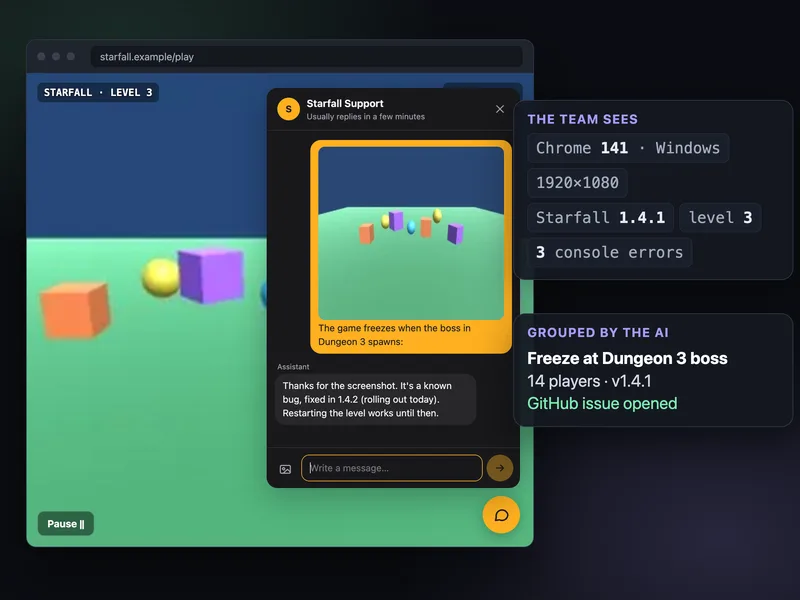
| Known bugs ("freezes at the Dungeon 3 boss") | Answer with the known workaround and the fix version, and collect details for unknown ones |
| Hello, thanks, "are you there?" | Answer and ask what's wrong |
| Purchase didn't arrive, refunds, compensation | Collect the facts and hand off. Never decide. |
| Account access, lost progress after a device change | Hand off. Identity mistakes are expensive. |
| Angry players, harassment, cheating reports, anything legal or about safety | Hand off at once |
| Feedback and feature requests | Thank them, tag it, no promises |
The first three rows are usually the bulk of the volume, and they're exactly where an AI is safe: the answer exists somewhere, and getting it slightly wrong costs little. The rest is where small teams get burned.
Ground it in your FAQ, not in the model's imagination
A general model knows a lot about games and nothing about yours. Left alone, it fills the gaps with plausible fiction: an event that ends "next week", a reward that doesn't exist. Three rules prevent most of that:
- Answer only from a knowledge base you wrote or reviewed, plus the conversation and what you know about the player (version, platform, purchases).
- When the answer isn't there, hand off. "I'll pass this to the team" is a good answer. A confident wrong one is not.
- Keep the FAQ alive. Every time a human answers a new question, that answer should become an FAQ entry, or the AI will keep handing off the same thing.
Answer, draft, or off
You don't have to choose between "AI answers everything" and "no AI". A middle setting does most of the good with little of the risk: the AI drafts, and a person approves, edits or discards. It's the right way to start. After a few weeks of drafts you can see which kinds of questions it gets right every time, and let it answer those on its own.
Two switches matter in practice: a pause for the whole game (launch day, an outage, a controversial patch), and an automatic step back when a human replies in a conversation, so the AI and your teammate don't talk over each other.
Money and promises stay human
The worst AI support stories aren't about bad grammar. They're about commitments: a refund promised, an item granted, a ban lifted. Write it into the AI's instructions and into the system around it:
- The AI never promises a refund, an item, a ban or an unban, and never asks for a password or payment details.
- Refunds and gifts are actions only a signed-in human can take. An AI or an API key can propose one, with the reason; a person decides.
- Everything is logged: who proposed, who approved, how much.
Our refund guide covers who can refund what on each store, which shapes what the AI should say ("Apple handles App Store refunds, here's how to ask") while a human looks at the case.
Languages and tone
Players write in their own language. You can have the AI write directly in the player's language, or, more predictable, write in your team's language and translate. With the second, every AI message is also readable by your team as written, and the player still gets their language. More on what translation gets wrong in support in every language.
Keep answers short (two to five sentences), warm, without headings or bullet lists in a chat bubble, and label the AI as an assistant in the chat. Players forgive a bot that says it's a bot.
Games with children
If part of your audience is under 13 (or under 16 in some EU countries), be stricter: no photos in the chat, profanity filter on, no offers or review prompts pushed automatically, and the AI handing off anything personal. Check what your privacy policy and the stores' kids rules say about collecting data before turning the chat on.
Measure it
- Handoff rate per topic: high on how-to questions means the FAQ is missing entries.
- Satisfaction after closing, split between conversations the AI closed and those a human closed.
- Reopened conversations: a player coming back an hour later means the answer didn't work.
- Cost per month, in AI messages or tokens, against the hours it saved.
How Inngame's AI works
Inngame's assistant follows the rules above, in code rather than in a slide:
- Off by default. Per game you choose answer, draft or off, and you can override it per conversation.
/pausein Telegram or Discord pauses it for the whole game; a human reply turns it off for that conversation. - FAQ-only answers. It answers from your FAQ (imported from your site, one page or a sitemap, or generated from past conversations and reviewed by you), the conversation and the player's details. It hands off when the answer isn't there, when the player is angry, asks for a refund or compensation, reports a payment, account or serious bug problem, harassment, or anything legal or safety-related.
- No money. Refunds (Stripe, Google Play) and gifts are human-only; the AI and agent API keys can only propose. Apple refunds go through Apple's own sheet.
- Your language in, theirs out. The AI writes in your team's language and the reply is translated for the player.
- Bugs grouped. Reports of the same problem are grouped into one bug, with an alert when they spike.
- Costs you can predict. 1,000 AI messages a month on Indie (€29), 10,000 on Studio (€99), or plug in your own Anthropic or OpenAI key for no cap. When the quota runs out, the AI goes quiet and leaves a note for the team instead of failing silently.
- Minors mode turns photos off and keeps the profanity filter and photo moderation on.
Questions
Can AI handle customer support for a game?
For a good share of it: how-to questions, known bugs with a workaround, greetings. It should hand off refunds, account problems, angry players and anything legal, and it should answer only from a knowledge base you've reviewed.
Should an AI support agent be allowed to give refunds or items?
No. Let it collect the facts and propose, and keep the decision with a person. In Inngame, refunds and gifts can only be made by a signed-in human; the AI and API keys can only propose.
What's the safest way to start with AI support?
Draft mode: the AI writes a reply and a person sends, edits or discards it. After a few weeks you'll see which questions it always gets right and can let it answer those alone.
Do I have to tell players they're talking to an AI?
Label it clearly in the chat. Players accept a bot that says it's a bot, and some laws require AI chatbots to identify themselves. Check the rules that apply where your players are.
How much does AI support cost with Inngame?
AI messages are included: 1,000 a month on Indie (€29) and 10,000 on Studio (€99). With your own Anthropic or OpenAI key there's no cap and you pay your provider directly.
Related: Refund requests in games · Support players in every language · Intercom alternative · Telegram support bot