How to run customer support from a Telegram bot
Small teams already live in Telegram, so answering customers from it is tempting. Here's how a support bot with one topic per customer works, what it takes to build one, and how to plug it into the chat inside your game or app.
Published 2 November 2026 by the Inngame team. Bot API details are from Telegram's documentation on that date (Bot API 10.3).
A help desk tab is easy to forget. Telegram isn't: it's already on everyone's phone, notifications work, groups are free, and a reply takes ten seconds from a bus. That's why so many small game and app teams end up answering customers from Telegram, whether they planned to or not.
Two different things people call a "Telegram support bot"
- Customers write to your bot. Players open a chat with
@YourGameSupportBotand the bot forwards their messages to your team. This makes sense when your audience already lives on Telegram (crypto, some mobile markets, Telegram Mini Apps). - Telegram is your team's inbox. Customers write wherever they are (inside your game or app, on your site) and each conversation shows up in a Telegram group where the team replies. The customer never needs Telegram.
The second setup is the one that scales to a game or an app, because most players will never install a messenger to report a bug. Both are built on the same Bot API features.
The trick: one forum topic per customer
Dumping every customer into one group chat works for about a day. What makes Telegram usable as a support inbox is topics: a group with Topics turned on becomes a forum, and a bot can open one topic per customer.
- The Bot API method
createForumTopiccreates a topic (name of 1 to 128 characters) in a forum supergroup. The Bot API docs say the bot must be an administrator with thecan_manage_topicsright. - Every message the bot posts with that topic's
message_thread_idlands in it, and every team message in it arrives with the same id, so the bot knows which customer to forward it to. - Being an admin also matters for a second reason: bots in privacy mode only receive commands and replies, while admin bots receive every message in the group (Telegram's bot FAQ).
Building it yourself
The minimal version is a small web service:
- Create the bot with @BotFather and keep the token secret.
- Create a private group, turn on Topics, add the bot as an admin allowed to manage topics.
- Register a webhook (
setWebhook) pointing at your service. - When a customer message arrives from your app, look up their topic, or create it with
createForumTopicand post a first message with who they are. ThensendMessageinto the topic. - When a team member writes in a topic, map the
message_thread_idback to the customer and deliver the reply to your app.
# Create a topic for a customer, then post their message into it
curl -s https://api.telegram.org/bot$TOKEN/createForumTopic \
  -d chat_id=-1001234567890 -d name="Mika · Starfall"
# → {"ok":true,"result":{"message_thread_id":42,...}}
curl -s https://api.telegram.org/bot$TOKEN/sendMessage \
  -d chat_id=-1001234567890 -d message_thread_id=42 \
  -d text="The boss in Dungeon 3 freezes the game"
That's the demo. The production version also has to handle:
- Limits. Messages are capped at 4,096 characters, and Telegram's FAQ says a bot can't send more than 20 messages per minute in the same group. A busy launch day can hit that.
- Photos both ways, downloaded from Telegram and stored somewhere the customer's app can show them.
- Who answered. Map Telegram accounts to teammates, ignore other bots and forwarded messages, and decide what happens to messages typed outside a topic.
- History outside Telegram. If someone leaves the group, or you add a second channel later, the conversation has to live in your own database, with the topic as a view of it.
- Context. A topic with only text in it is no better than email. Post the customer's device, version and account in the topic's first message.
With Inngame
Inngame does setup 2 for games and apps. Players write in the chat inside your game or app (Unity, iOS or web SDK); your team answers in Telegram. Setup takes a few minutes: paste the bot token and the group's chat id in the dashboard, and Inngame registers the webhook and posts a confirmation in the group (details in the Telegram integration docs).
- A topic per player, named after the player and the game, opened with a profile card: name, verified badge, language, email or Steam profile, device, OS, app version and up to eight of your custom fields.
- Translated both ways. The player's message arrives in your team's language with the original underneath; your reply is translated back. Photos go both ways, and profanity is masked.
- Game context on each message: a few key values like scene or level, in a code line under the text.
- Buttons under each message: Close, Let AI answer, Ask review, Open in the web inbox. When the AI is in draft mode, its draft arrives with Send and Discard buttons, so approving takes one tap.
- Commands:
/close,/reopen,/ai,/draft,/noai,/reviewand/blockinside a topic;/stats(last 7 days),/pauseand/resumefor the AI anywhere. - One thread everywhere. Replies sent from the web inbox or by the AI are echoed silently in the topic. When someone replies from Telegram, the AI steps back from that conversation.
- No topics? It also works in a plain group: player messages arrive as notifications and you answer by replying to them.
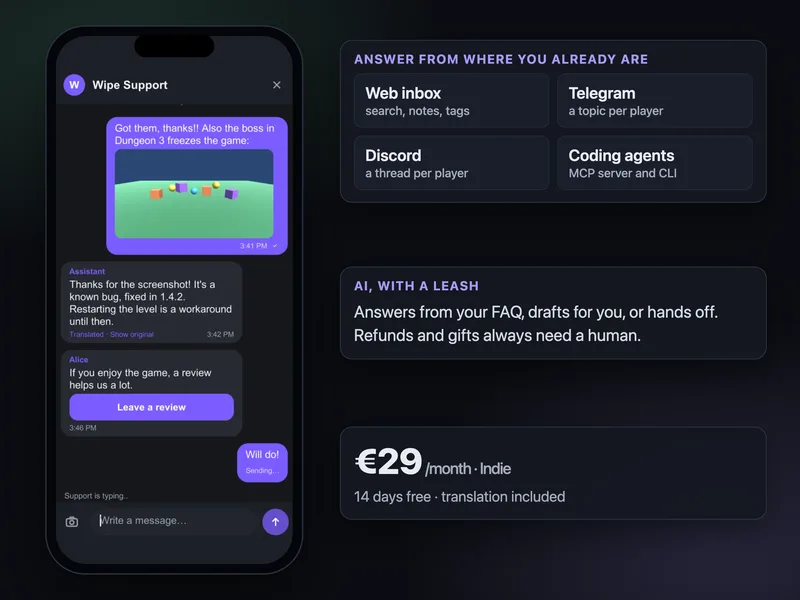
The same works on Discord, with a thread per player in a private forum channel; see Discord or an in-game chat. Telegram is included in both plans, from €29 a month, with a 14-day trial.
One limit to know: players can't write to the Inngame bot on Telegram directly. If your customers are on Telegram and want to stay there (setup 1), a dedicated Telegram helpdesk bot is the better fit.
Questions
Can I use Telegram for customer support?
Yes. Either customers message your bot directly, or Telegram serves as your team's inbox for messages that come from your app or game. For the second, a group with Topics and one topic per customer keeps conversations apart.
How do I create a topic per customer with a Telegram bot?
Turn on Topics in a group, make the bot an admin with the can_manage_topics right, and call createForumTopic for each new customer. Post with the returned message_thread_id, and use the same id to route team replies back.
Is there a limit on how many messages a Telegram bot can send?
Telegram's bot FAQ says to avoid more than one message per second in a single chat, and that bots can't send more than 20 messages per minute in a group.
Do my players need Telegram to get support?
Not with Inngame. Players write in the chat inside your game or app; only your team uses Telegram.
Can the AI reply in Telegram?
In Inngame, the AI replies in the player's chat and its message is echoed in the Telegram topic. In draft mode, the draft arrives in the topic with Send and Discard buttons.
Related: Discord or an in-game chat? · Support players in every language · AI customer support for games · Player support tool for indie games