How to respond to App Store reviews, and get fewer bad ones
A one-star review is often a support request that found no other way in. Here's how replying works on the App Store and Google Play, what the stores allow you to write, replies for the common cases, and how to get fewer of them in the first place.
Published 2 November 2026 by the Inngame team. Store rules are quoted from Apple's and Google's own pages on that date.
Can developers respond to App Store reviews?
Yes, on both stores, and the player hears about it.
| App Store | Google Play | |
|---|---|---|
| Where | App Store Connect, under Ratings and Reviews (or the App Store Connect API) | Play Console, under Ratings and reviews (or the Reply to Reviews API) |
| Who | Account Holder, Admin or Customer Support roles | Users with the "Reply to reviews" permission |
| Player notified | Yes, and they can update their review | Yes, by push notification and email, and they can update their rating |
| Editing | Any time; only the latest version is shown | Any time; one public reply per review |
| Abusive reviews | Use Report a Concern instead of replying | Flag the review in Play Console |
Sources: Apple's Ratings, reviews, and responses page and Google's Play Console help on reviews, both checked on 2 November 2026. Apple says a response can take up to 24 hours to appear. Google also shows, in Play Console, which players changed their rating after you replied, which is the closest thing to a scoreboard for your replies.
The rules for what you write
Apple's App Review Guideline 5.6.1 asks you to keep responses "targeted to the user's comments" and to leave out personal information, spam and marketing. Google asks for replies that are "clear, valuable, and truthful", and forbids abuse and solicitation; breaking its rules can get the app or the developer account suspended. In practice:
- Answer the actual complaint, in the reviewer's language.
- No promo codes, no "check out our new game", no links to unrelated pages.
- Don't argue facts in public. If the player is wrong, say what the game does and how to get help.
- Never ask for an email, a receipt or an account id in the reply. Point to the in-app support instead.
Replies that tend to work
Short, specific, signed by a person, with one next step. Four common cases:
A bug
"Sorry about the freeze at the Dungeon 3 boss. It's fixed in 1.4.2, which is rolling out now. If it still happens after updating, tap Help in the pause menu and send us a screenshot; we read everything. — Alice"
A purchase that didn't arrive
"That shouldn't happen. Open Settings → Restore purchases first; that fixes most cases. If the gems still aren't there, write to us from Help in the game and we'll sort it out with you."
"I want a refund"
"Purchases on the App Store are refunded by Apple, not by us. You can ask Apple at reportaproblem.apple.com. If something in the game went wrong, tell us from Help in the game and we'll fix it." On Google Play, you can refund the order yourself; say so and ask them to contact you in the app. Our refund guide has who refunds what on each store.
A design complaint ("too many ads", "too hard")
"Fair point about the ads after every level. Since 2.1 there's one every three levels, and none if you've bought anything. Thanks for saying it." Only write that if it's true. If it isn't changing, say why in one sentence and stop.
Why bad reviews happen to small teams
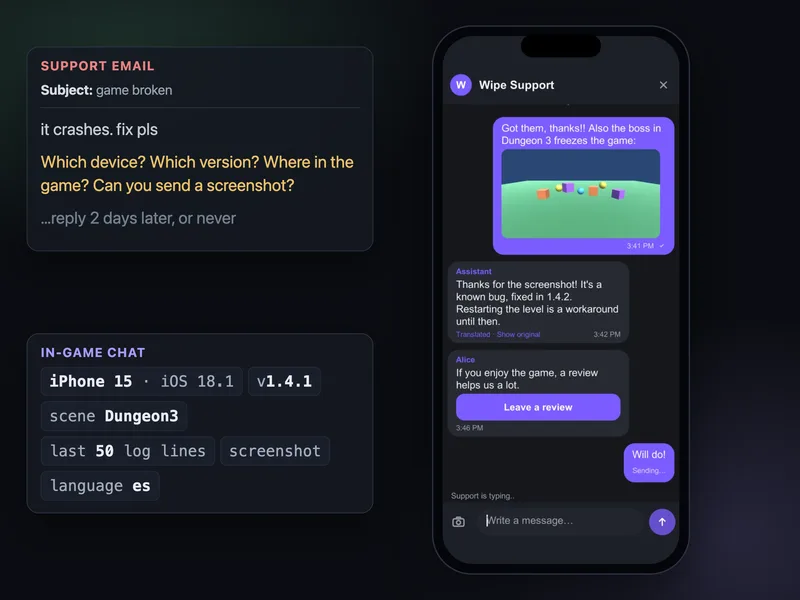
Read your one-star reviews from the last three months and sort them. On most games, a large share isn't about the game design at all. It's support: a purchase that didn't go through, progress lost after a phone change, a crash on one GPU, a question nobody answered. The player looked for a way to reach you, didn't find one, and the review box was the only text field left.
Apple says it plainly on its reviews page: making your support contact easy to find "gives you an opportunity to resolve negative experiences that may otherwise lead to poor reviews". A support link buried in the store listing doesn't do that. A Help button in the pause menu does.
How to get fewer bad reviews
- Put help inside the game. A chat or a form one tap away from the problem, with the device and build attached so you can actually answer.
- Fix the top three causes. Restore purchases that works, cloud saves tied to an account rather than a device, and crash fixes for the devices in your reviews.
- Ask for ratings at the right moment. Apple lets the system prompt appear at most three times in 365 days and recommends asking after the player completes something, without interrupting. Google's in-app review card has an undisclosed quota, and Google says not to trigger it from a button.
- Don't filter by mood. Google's guidelines forbid asking "Do you like the app?" or "Would you rate us 5 stars?" before or while showing its review card, and Apple disallows custom review prompts (guideline 5.6.1). Ask everyone, at a good moment, with the store's own prompt.
- Reply to recent reviews first. A reply to a review from last week can change a rating. A reply to one from two years ago mostly reassures readers, which is still worth something for your top reviews.
- Reset the App Store summary rating only after a real fix. Apple lets you reset it per country with a new version, recommends doing so sparingly, and the written reviews stay.
Where Inngame fits
Inngame doesn't reply to store reviews for you; use App Store Connect and Play Console for that. It works upstream, so fewer players get to the review box angry:
- A support chat inside the game (Unity, iOS, web), with the build, device, recent logs and a screenshot attached, translated both ways.
- A review card that never depends on the player's mood or score. With "Offer the store review after a resolved conversation" turned on, every player whose conversation is closed gets the "Rate the game" card, whether they rated the support 1, 5 or not at all, once per player, never in minors mode. The card is a plain link to the store's own review page: on iOS the App Store "Write a Review" page (not the system prompt, which Apple advises against showing in response to a button), on Android the Play Store listing, on PC the Steam review page.
- An optional satisfaction card (1 to 5) about the support conversation itself, for the team's stats only: it doesn't decide who gets the review card. A 1 or 2 raises the conversation's priority and notifies the team.
- Your team can also send the review card by hand (inbox, Telegram, Discord), and automations can send it on any trigger. The AI may attach it only in the reply that resolves the player's problem, never based on the player's mood or rating, never while an issue is still open; AI and automations send it at most once per player.
Questions
Can you respond to App Store reviews?
Yes. In App Store Connect, users with the Account Holder, Admin or Customer Support role can reply to reviews. The reviewer is notified and can update their review, and you can edit your reply at any time.
Does the user get notified when a developer replies on Google Play?
Yes. Google sends a push notification and an email with your reply, and the user can update their rating or review afterwards.
Can I delete a negative App Store review?
No. You can reply, or use Report a Concern in App Store Connect if the review is offensive, spam or breaks Apple's terms. Resetting the summary rating with a new version doesn't remove written reviews.
How often can I ask for an App Store rating?
Apple's system prompt appears at most three times in a 365-day period for a given user, whatever your code asks. Google Play's in-app review has a quota too, which Google doesn't publish.
Is it allowed to ask happy users only for a review?
Not with the stores' prompts. Google forbids asking about the user's opinion before or while showing its review card, and Apple disallows custom review prompts. Ask at a good moment instead, after the player finishes something.
Related: Refund requests in games · Support players in every language · Mobile games · iOS apps