In-app support chat for iOS apps
A Swift package that adds a native support chat to your iPhone app, in SwiftUI or UIKit. Users write in their language; your team answers in yours, from a web inbox, Telegram or Discord.
14 days free. From €29/month after that. Translation included.
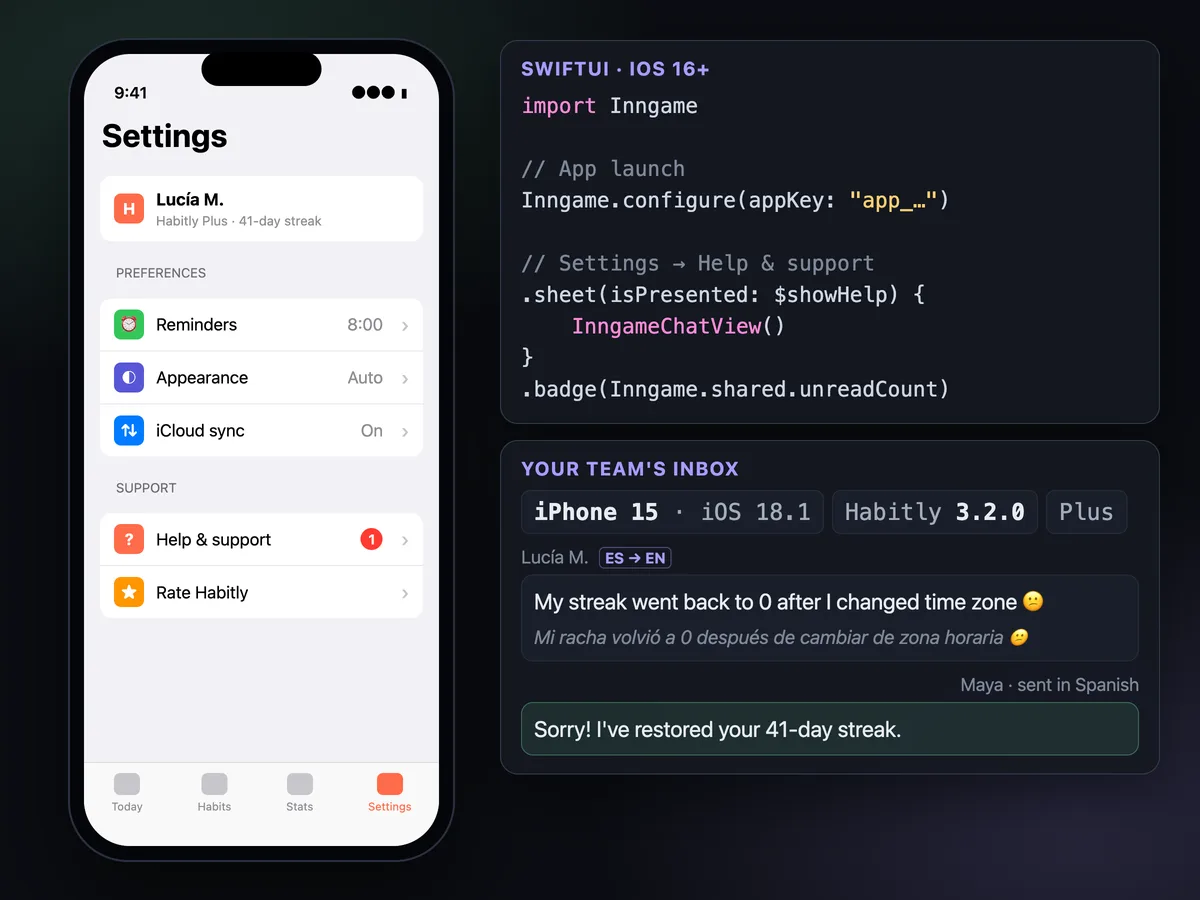
A support screen that feels like the rest of your app.
The chat is a SwiftUI view you present like any other sheet, or one call from UIKit. Users write in their language; your team answers from the inbox, Telegram or Discord.
SwiftUI and UIKit
InngameChatView() in a sheet, or Inngame.present(from:) from a view controller. unreadCount is published, so a .badge on your Help row stays current.
Messages that survive bad network
Written offline, a message stays on the device as "Sending…" and goes out when the network returns or at the next launch, once. One the server refuses for good leaves the queue.
Push replies
Pass the APNs token and replies reach users when the chat is closed. handleNotification recognizes Inngame notifications so you can open the chat on tap.
Data deletion inside the app
deleteMyData() erases the user, their conversations and photos. Put it behind a "Delete my support data" button; logout() starts over as a new anonymous user.
Context your team can use
Device, OS, app version and locale are attached. Add your own keys, like the current screen or an order id, with setContext; users never see them.
Cards in the conversation
Your team can send a review card that opens the system rating prompt, Apple's refund request sheet for a transaction, a 1 to 5 satisfaction rating, or a link.
History follows the account, purchases follow the user.
Users start anonymous, so the chat works before login. After login, identify them with a JWT signed by your server: only verified users get their history on every device.
For subscriptions, pass Inngame's purchase token as StoreKit's appAccountToken. App Store Server Notifications then become automation triggers and show up on the user's profile.
Inngame.track("checkout_failed")· automations can answer with a message or open the chat- Translation both ways · included in every plan
- AI off by default · answers from your FAQ only if you turn it on
// Verified, with attributes your team sees in the profile
let jwt = try await api.inngameToken()
Inngame.identify(userId: user.id, name: user.displayName,
                 email: user.email, token: jwt,
                 metadata: ["plan": "pro"])

// Subscriptions: App Store Server Notifications
guard let token = Inngame.purchaseToken else { return }
let result = try await product.purchase(options: [.appAccountToken(token)])Add the package, configure, present.
In Xcode, File → Add Package Dependencies with https://github.com/inngame/sdk-ios, from version 0.1.0. Configure once at launch with your public app key, then show the chat wherever your Help entry is.
- iOS 16 and later
- Your colors and texts · from the dashboard, without an app update
- 25 interface languages
import SwiftUI
import Inngame

@main
struct MyApp: App {
    init() { Inngame.configure(appKey: "app_XXXXXXXX") }
    var body: some Scene { WindowGroup { ContentView() } }
}

struct SettingsView: View {
    @State private var showHelp = false
    var body: some View {
        Button("Help & support") { showHelp = true }
            .sheet(isPresented: $showHelp) { InngameChatView() }
    }
}Docs and guides for iOS apps.
Questions
Is there a React Native or Flutter SDK?
No. The iOS SDK is a Swift package for native apps written with SwiftUI or UIKit. Other stacks can talk to the REST API.
Is there an Android version of the app SDK?
No native Android SDK for regular apps. On Android, Inngame currently runs in Unity games; for a web-based app, the web SDK works in any browser.
Can my team answer from their phones?
A native iOS app for your team is planned for later. Until then, teammates can answer from Telegram or Discord, or add the web inbox to their Home Screen to get push notifications when a user writes.
What is the minimum iOS version?
iOS 16. The device token is kept in the Keychain, and the package is added with Swift Package Manager from Xcode.
Answer users where they already are: in your app.
Configure once at launch, present the chat from your settings screen.
14 days free. From €29/month after that. Translation included.