Unity Player.log location, and how to get logs from players
Player.log is where your Unity build writes every Debug.Log, warning and exception. Finding it on your own machine is easy. Getting it from a player who just hit a bug on their phone or Steam Deck is the hard part.
Published 2 November 2026 by the Inngame team. Paths are taken from Unity's manual; the capture code is plain Unity, no SDK needed.
Where Unity writes Player.log
From the Unity manual's page on log files (Unity 6.6, the current version on 2 November 2026). CompanyName and ProductName are the values from Player Settings.
| Platform | Player log |
|---|---|
| Windows | %USERPROFILE%\AppData\LocalLow\CompanyName\ProductName\Player.log |
| macOS | ~/Library/Logs/CompanyName/ProductName/Player.log (also visible in Console.app) |
| Linux | ~/.config/unity3d/CompanyName/ProductName/Player.log |
| Windows Store (UWP) | %USERPROFILE%\AppData\Local\Packages\<productname>\TempState\UnityPlayer.log |
| Android | No file: read it with adb logcat (filter on Unity) |
| iOS | No file you can ask for: the device console in Xcode (Devices and Simulators, or Console.app) |
| WebGL | The browser's JavaScript console |
A few practical notes the table doesn't tell you:
- In the Editor, the Console window's ⋮ menu has Open Player Log, which opens the log of the last build you ran on this machine.
- From code,
Application.consoleLogPathreturns the path of the running player's log. Show it in a debug menu, or add a "Copy log folder" button so players don't have to type it. - The file starts again at each launch. If a player relaunched after the crash, the run you want is usually in
Player-prev.lognext to it. - AppData is hidden on Windows. Tell players to press Win + R and paste
%USERPROFILE%\AppData\LocalLow; it saves a round of "I can't find that folder". - Steam Deck and Proton. A Windows build running under Proton writes inside its prefix:
steamapps/compatdata/<appid>/pfx/drive_c/users/steamuser/AppData/LocalLow/CompanyName/ProductName/.
Make the log worth reading
Before worrying about getting the file, check that it contains something useful in a release build:
- Stack traces per log type. In Project Settings → Player → Other Settings → Stack Trace, keep at least Script Only for errors and exceptions. Setting everything to None makes logs smaller and useless.
- Line numbers with IL2CPP. Recent Unity versions have an IL2CPP Stacktrace Information setting; "Method Name, File Name, and Line Number" costs some build size and makes traces from players readable.
- Log state changes, not frames. One line when a scene loads, a purchase starts or finishes, a save is written or a network call fails. Players' logs get cut and capped; a log full of per-frame noise pushes the useful line out.
- Never log secrets. No session tokens, emails or receipts. Whatever you log may end up in a support ticket or a public forum post.
Option 1: ask players to send the file
It works for PC players who are motivated: testers, your Discord regulars, people stuck on a progression bug. Write the path for each OS in your FAQ, ask for both Player.log and Player-prev.log, and give them a place to upload (a Discord channel, a form, an email address).
It falls apart everywhere else. Mobile players can't reach the file at all. Most players won't dig through hidden folders for a game they've already decided is broken, and by the time they reply the game has been relaunched twice and the run you needed is gone. You also get the log without the rest: which build, which device, what the player was doing.
Option 2: capture logs inside the game
The better pattern is to keep the last lines in memory and attach them when the player reports a problem. Unity gives you the hook: Application.logMessageReceivedThreaded is called for every log line, from any thread. A minimal ring buffer:
using System.Collections.Generic;
using UnityEngine;

public static class RecentLogs
{
    const int Max = 200;
    static readonly Queue<string> lines = new Queue<string>();
    static readonly object gate = new object();

    [RuntimeInitializeOnLoadMethod(RuntimeInitializeLoadType.SubsystemRegistration)]
    static void Hook() => Application.logMessageReceivedThreaded += OnLog;

    static void OnLog(string msg, string stack, LogType type)
    {
        bool err = type == LogType.Error || type == LogType.Exception || type == LogType.Assert;
        string line = $"{System.DateTime.UtcNow:HH:mm:ss} [{type}] {msg}" + (err ? "\n" + stack : "");
        lock (gate)
        {
            lines.Enqueue(line);
            while (lines.Count > Max) lines.Dequeue();
        }
    }

    public static string Dump()
    {
        lock (gate) return string.Join("\n", lines);
    }
}
Then, from your bug report screen, send RecentLogs.Dump() together with Application.version, SystemInfo.deviceModel, SystemInfo.operatingSystem, SystemInfo.graphicsDeviceName and the active scene. Things to watch:
- Threads. The threaded callback can fire off the main thread, hence the lock. Don't touch Unity objects inside it.
- Size. Cap each line (a long JSON dump can be megabytes) and the total you upload.
- Native crashes. A hard crash kills the process before any C# runs, so the buffer dies with it. Use a crash reporter (Unity's own diagnostics, or a third-party one) for those, and the in-game log for everything that doesn't kill the game: errors, soft locks, failed purchases, broken saves.
- Privacy. Logs about a player are personal data in the EU. Say in your privacy policy that reports include technical logs, keep them for a limited time, and include them when a player asks for their data (see player data requests).
What Inngame attaches for you
Inngame's Unity SDK does the above inside the support chat, so a player's message is the bug report:
- The last 50 log lines (change it with
LogLines, 0 turns it off), with stack traces for errors, exceptions and asserts. Lines are capped at 1,000 characters, traces at 2,000, and the whole context at 64 KB per message, oldest lines dropped first. - The active scene and the last 10, app, Unity and SDK versions, device, OS, CPU, RAM, GPU, resolution, quality level, average and minimum FPS, memory and GC, language and time zone. Add your own values with
Inngame.SetContext("level", 12). - A screenshot from F8 on desktop or a shake on mobile, without the chat in it.
- Reports describing the same problem are grouped into one bug by the AI; you can open a GitHub issue from it with versions, platforms and logs (no player identity), and players are told when they update to the version with the fix.
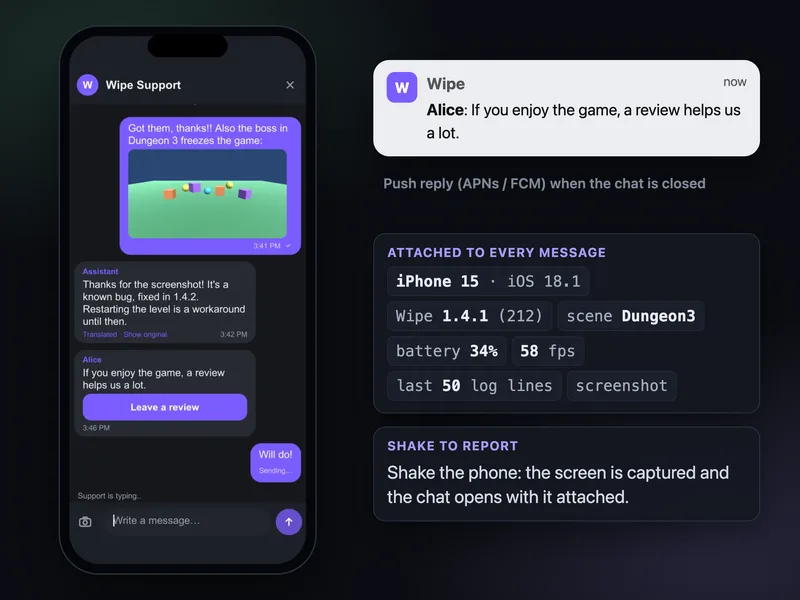
The setup is in the Unity support chat guide, and the bug report tool page shows the reporting flow in more detail.
Questions
Where is the Unity Player.log on Windows?
In %USERPROFILE%\AppData\LocalLow\CompanyName\ProductName\Player.log, where CompanyName and ProductName come from Player Settings. The AppData folder is hidden; paste the path into Win + R or the Explorer address bar.
Where is Player.log on macOS and Linux?
On macOS, ~/Library/Logs/CompanyName/ProductName/Player.log (Console.app shows it too). On Linux, ~/.config/unity3d/CompanyName/ProductName/Player.log.
How do I get Unity logs from Android and iOS players?
There's no file a player can send. Developers read Android logs with adb logcat and iOS logs in Xcode's device console. For players, capture recent log lines in the game with Application.logMessageReceivedThreaded and attach them to their bug report.
Does Debug.Log work in a release build?
Yes. Debug.Log output goes to Player.log in release builds too. Stack traces depend on the Stack Trace settings in Player Settings, and IL2CPP builds only show line numbers if you enable it in the IL2CPP stack trace setting.
How do I find the log path from code?
Application.consoleLogPath returns the path of the current player's log file.
Related: Support chat in a Unity game · In-game bug report tool · PC and Steam games · Context and logs in the docs