In-game bug report tool with screenshots
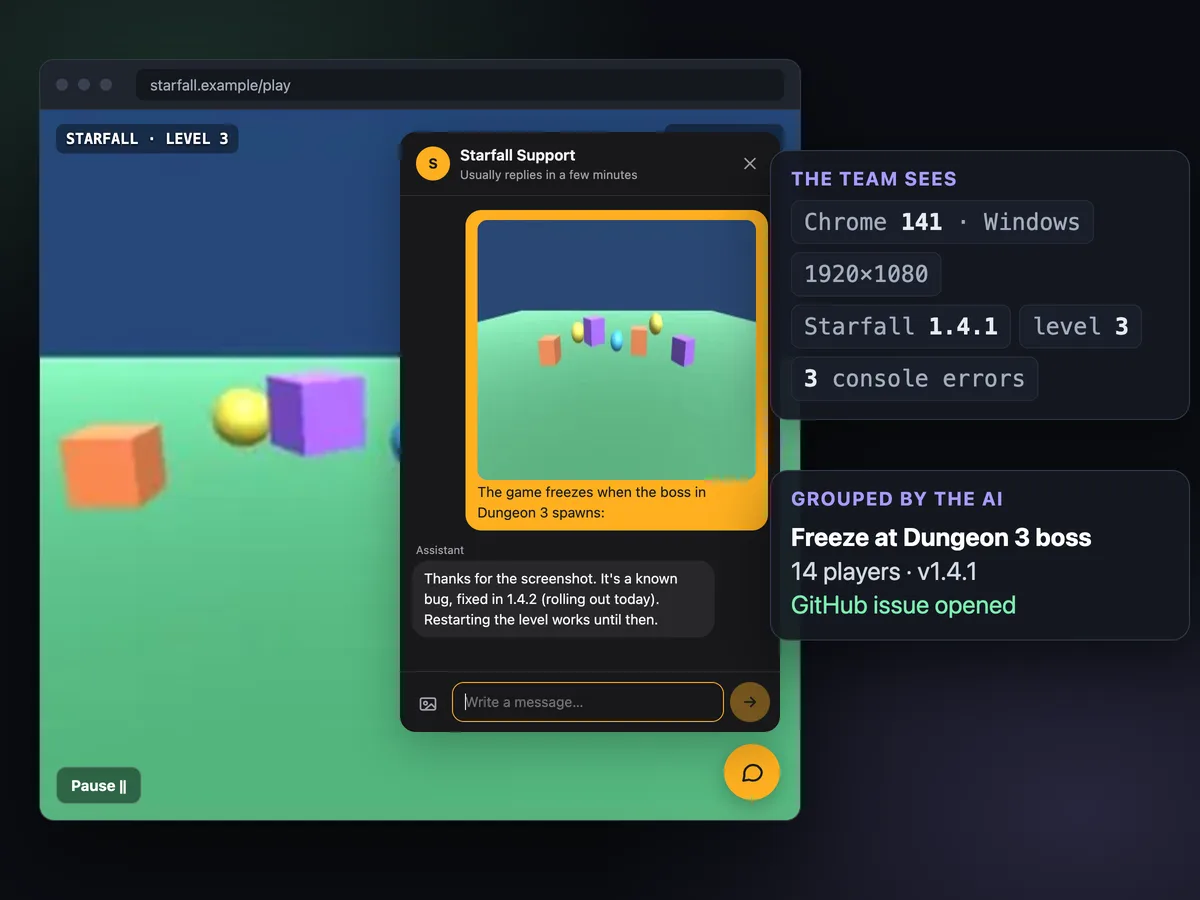
Players press Help, shake the phone or hit F8. The chat opens with a screenshot, the last 50 log lines, the scene and the exact build attached. Reports about the same problem are grouped into one bug, and players hear back when the fix ships.
14 days free. From €29/month after that. Translation included.
"It crashes. Fix pls."
That's what arrives by email or in a store review. No version, no device, no idea where in the game. You write back asking for all of it, and half the time nobody answers. A bug report tool inside the game fixes the first message: the player only has to say what went wrong, and the rest is attached.
A screenshot in one gesture
In Unity games the chat has a camera button, F8 captures on desktop, and a shake opens the chat on phones with the capture attached. The chat itself is never in the picture.
The last 50 log lines
Unity sends the last 50 log lines with stack traces for errors. The web SDK sends the last 50 console errors and warnings, plus uncaught exceptions and rejected promises.
Build and device
App, Unity and SDK versions, OS, device model, CPU, RAM, GPU and graphics API, resolution, average and minimum FPS, memory, battery and network. In a browser: page URL, browser, viewport.
Where they were
The active scene and the last 10 scenes. Add your own keys with SetContext or a ContextProvider: level, save slot, quest, coins. The web SDK takes a context() function.
In their language
A player writes in Portuguese, your team reads English, and the reply goes back in Portuguese. Bug detection reads the translation, so reports in ten languages land on the same bug.
Who it is, when it matters
With a verified Steam account or a signed token from your server, you know whose save is broken without asking for an id. Anonymous players work too.
Forty messages, one bug.
Turn on bug detection for the app and every new player message gets checked: is it a bug, and is it one you already know? The AI compares it with the 20 most recently active open bugs. A match adds a report to that bug, with the player's app version and platform. Otherwise it opens a new bug with a short title and summary. The conversation gets a bug tag either way.
Questions, opinions and "this level is too hard" are left alone. Only reports of something broken count: crashes, freezes, lost progress or purchases, visual glitches.
- 5 reports in 24 hours trigger an alert · in the inbox, Telegram, Discord, and a
bug.spikewebhook - One alert per bug · a wave doesn't page you forty times
- Reports carry version and platform · so you can see it only hits 1.4.1 on Android
From report to issue to "it's fixed".
Connect a GitHub repository and a bug becomes an issue in one call, labeled bug and inngame, with the summary, report count, app versions, platforms and log excerpts. Players' names and emails stay out of it. If your repository has a coding agent, Inngame can comment on the issue to ask it for a minimal fix and a pull request. It never merges anything.
When you ship, mark the bug as fixed in a version. Players who reported it and already run that version get a message right away. The others get it when they update, because every session tells the server which build they're on. Nobody has to keep a spreadsheet of who to email back.
- From the API, the CLI or MCP ·
inngame bug bug_… --fixed-in 1.4.2 - Each player is told once · even if they open the game from two sessions at the same time
- Listed in the audit log · which players were told, and when
using InngameSDK;

Inngame.Configure("app_XXXXXXXX", new InngameOptions
{
    ShakeToReport = true,            // phones
    ScreenshotHotkey = KeyCode.F8,   // desktop, the default
});

// Your own state, attached to every message
Inngame.ContextProvider = () => new Dictionary<string, object>
{
    ["level"] = level.Id,
    ["saveSlot"] = save.Slot,
};

// A "Report a bug" button in the pause menu
reportButton.onClick.AddListener(() => Inngame.CaptureScreenshot());Where this fits next to the tools you have.
Most studios already run a crash reporter. Keep it: it catches exceptions on machines where nobody would ever write to you. What it can't see is a game that runs fine and is still broken. The reward that never arrives. The door that won't open after loading a save. Those only reach you when a player tells you, and they tell you better when the question comes to them at the right moment, in the game, with the evidence attached.
Inngame is also a support chat, so the same conversation carries the answer. The AI can reply from your FAQ ("known bug, fixed tomorrow, restart the level"), or draft for your team, or hand off. You can send the player a claimable item to make up for a lost reward; only a signed-in admin can do that, never the AI. The chat works with a gamepad on PC and on the Steam Deck, full screen on phones, and in a single script tag for HTML5 games.
Docs and guides for bug reports.
Questions
Does the chat show up in the screenshot?
No. The Unity SDK hides its own interface before capturing, whether the capture comes from the camera button, the F8 hotkey, a shake or Inngame.CaptureScreenshot() in your code.
Can players attach screenshots in a browser game or an iOS app?
Yes. The web SDK and the iOS SDK have a photo button: the player picks an image, it is resized and checked by moderation before it is stored. Taking the capture is up to the player (or to your code, which can attach any image you already have).
Do I need GitHub?
No. Bugs are grouped inside Inngame and you can list and update them from the API, the CLI or your coding agent through MCP. GitHub is optional: connect a repository when you want reports to become issues.
Do player names or emails end up in the GitHub issue?
No. The issue gets the summary, the number of reports, app versions, platforms and log excerpts. Never the players' identity.
Does the AI file bugs on its own?
Only if you turn bug detection on for the app. Each detection is one AI call and counts against your plan's AI replies, or costs nothing on our side if you use your own AI key. Opening the GitHub issue stays a separate step for your team or your agent.
Is this a crash reporter?
No. Crash reporters catch exceptions without the player doing anything, and you should keep yours. Inngame covers what they miss: bugs the game survives, like a boss that takes no damage, a missing reward or a softlock, told by the player with a screenshot and the last 50 log lines.
Get bug reports you can act on from the first message.
Unity, HTML5 and iOS. Set it up in an afternoon, or with one prompt to your coding agent.
14 days free. From €29/month after that. Translation included.