Customer support for a Steam game
Steam takes care of payments and refunds. Crashes, broken saves, missing items and Steam Deck controls are your job. Give players a Help button in the pause menu: they write in their language, and you get their SteamID, the build and the last 50 log lines with the first message.
14 days free. From €29/month after that. Translation included.
What Steam handles, and what lands on you.
Steam runs the store, the payment and the refund desk. Its refund page says games can be refunded on request at help.steampowered.com within two weeks of purchase and with less than two hours of playtime. For in-game purchases in games not made by Valve, Steam says they aren't refundable through Steam unless the developer chooses to allow it, and the store tells the buyer at purchase time.
Everything else is yours. Steam doesn't know why the game crashes on a laptop with two GPUs, why a save from 0.9 won't load in 1.0, or why an achievement didn't unlock. Those players have three places to go: your store page discussions, a review, or an email address they found somewhere.
Steam discussions
Good for patch notes and for one answer that helps a hundred players. Bad for "my save is gone": public, no logs, and you have to ask which build and which hardware before anything else.
Reviews
A frustrated player with no obvious way to reach you writes a review instead. You can reply publicly, but the conversation you needed happens in the wrong place, after the damage.
Email and Discord
Email loses the context. Discord only reaches players who joined your server. Neither knows which Steam account wrote, so you end up asking for a profile link.
Put the help desk in the pause menu.
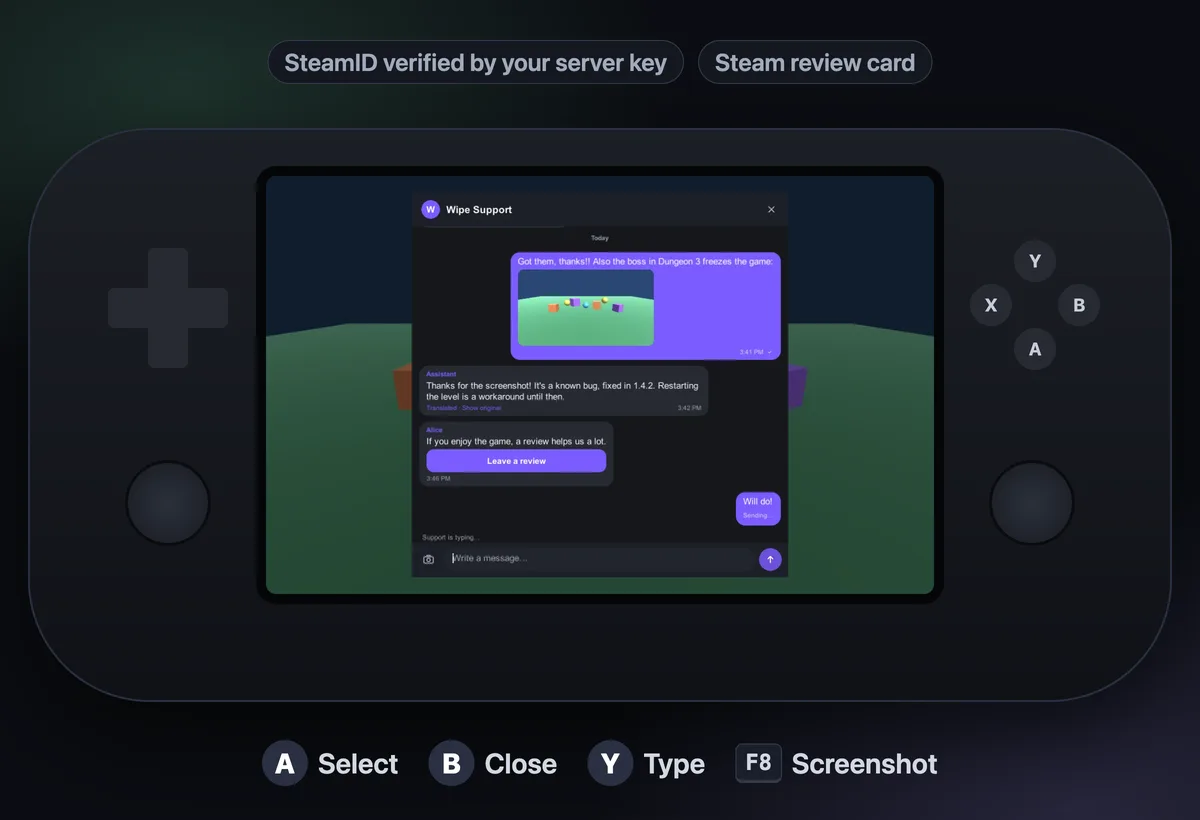
Inngame adds a support chat to a Unity game on Windows, macOS and Linux. The player opens it from your pause or settings menu, with a mouse, a keyboard or a gamepad, and writes in their own language. Your team answers from a web inbox, a Telegram group, a Discord channel or the iPhone app.
Each message arrives with what you would have asked for: the build, the OS, CPU, RAM, GPU name, vendor and graphics API, resolution and refresh rate, average and minimum FPS, the active scene and the last 50 log lines with stack traces. F8 takes a screenshot and opens the chat with it attached, without the chat in the picture. You can add your own keys, like the save slot or the current quest.
- Verified SteamID · the SDK sends a Web API ticket, the server checks it with Steam using your publisher key
- Gamepad and Steam Deck · focus outline, Y to type, B to close, Steam's on-screen keyboard through a hook
- 25 interface languages · and messages translated both ways
What a Steam studio actually deals with.
Launch week. Twenty players report the same crash in different words and languages. With bug detection on, they land on one bug with versions and platforms; at five reports in 24 hours your Telegram or Discord gets an alert. Connect GitHub and the bug becomes an issue with log excerpts and no player identity. When 1.0.2 ships, mark it fixed and each reporter is told when they run that version.
"I bought the supporter pack and got nothing." You can't refund a Steam purchase from Inngame, and you don't need to: an admin sends an item card, the player claims it once, your game grants it. The AI can't send items or promise refunds. Our refund guide covers who refunds what across stores.
Off hours. Set office hours and the chat shows when you're back, in the player's time zone, with an optional automatic reply. Or let the AI answer the known questions on its own and keep the rest for the morning.
After a good fix. Send a review card. It opens your Steam store page's review form. Ask when the player is happy, and never tie it to a reward.
using InngameSDK;
using Steamworks;   // Steamworks.NET

var options = new InngameOptions();
options.OnScreenKeyboard = (current, done) => { /* SteamUtils.ShowGamepadTextInput… */ };
Inngame.Configure("app_XXXXXXXX", options);

// Verified SteamID: a Web API ticket for "inngame",
// checked by the server with your publisher key
await Inngame.IdentifySteam(GetSteamTicketHex);

pauseMenu.help.onClick.AddListener(Inngame.OpenChat);
Inngame.UnreadChanged += n => pauseMenu.SetBadge(n);An afternoon, in four steps.
1. Add the Unity package (Unity 2022.3 LTS or Unity 6) and your app key. 2. In Steamworks, create a publisher Web API key and enter it in Inngame with your App ID, then call IdentifySteam. 3. Add a Help button to the pause menu and, for the Deck, the on-screen keyboard hook. 4. Write a short FAQ (your known issues, the save folder location, how to verify game files) so the AI has something to answer from. Or give one prompt to your coding agent: inngame init unity prints the instructions.
Players' data stays in the EU. Each app has its own retention setting for closed conversations, and you can export or delete a player's data from the inbox when they ask.
Docs and guides for Steam games.
Questions
Can Inngame refund a Steam purchase?
No. Refunds of games and DLC bought on Steam go through Steam, requested by the player at help.steampowered.com. Inngame refunds Stripe and Google Play payments and sends Apple's refund sheet, none of which applies to a Steam purchase. What you can do from a conversation is give back an in-game item with a card the player claims once.
Do players need to log in to use the chat?
No. Every player starts anonymous and the chat works right away. If you connect Steam and call IdentifySteam, the player's SteamID is verified by the Inngame server with your publisher Web API key, and their history follows that account.
Does it work on the Steam Deck?
Yes. The chat is navigable with the gamepad (Y jumps to the text field, B closes), and you plug Steam's on-screen keyboard into the SDK's OnScreenKeyboard hook so players can type in Big Picture mode.
Which Steam libraries are supported?
The Unity quickstart has ticket helpers for Steamworks.NET and Facepunch.Steamworks. Both ask Steam for a Web API ticket for the identity "inngame".
Should I drop the Steam discussions?
No. Keep them for your community. Point players to the in-game Help button for anything that needs their account, their save or their logs, and answer in the forum when one fix helps everyone.
What if the player closed the game before we answered?
The reply waits in the chat. Next time they launch, the unread count is there for your Help button (Inngame.UnreadCount and the UnreadChanged event), and the conversation picks up where it stopped.
Answer Steam players before they write the review.
Set it up in an afternoon, or with one prompt to your coding agent.
14 days free. From €29/month after that. Translation included.